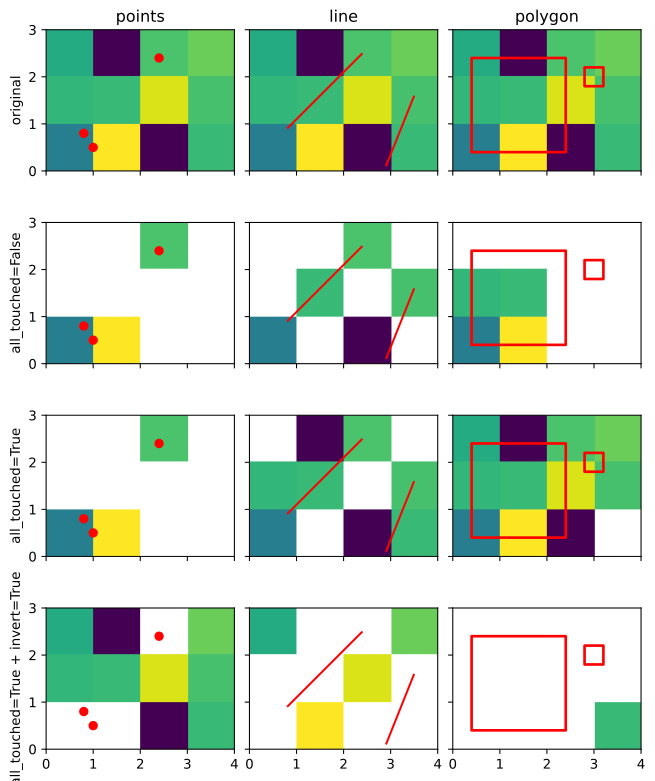
geost.models.model_dataset.ModelDataset.mask_geometries#
- ModelDataset.mask_geometries(geometries: str | Path | gpd.GeoDataFrame | GeometryType, crs: str | int | CRS = None, all_touched: bool = False, invert: bool = False, drop: bool = False) xr.Dataset | xr.DataArray#
Mask ‘x’,’y’-locations that overlap with geometries (points, lines, polygons).
- Parameters:
geometries (str | Path | gpd.GeoDataFrame | GeometryType) – Any type of geometry that can be used to mask the model. This can be a path to shapefile-like file, a GeoDataFrame, or a single geometry or list of geometries.
crs (str | int | CRS, optional) – The CRS of the input geometries. The default is None, then it is assumed to be the same as the dataset’s CRS.
all_touched (bool, optional) – If True, all pixels touched by geometries will be selected. If false, only pixels whose center is within the polygon or that are selected by Bresenham’s line algorithm (in case of lines) will selected. In case the geometries are any cell that overlaps with a geometry will be selected. The default is False.
invert (bool, optional) – If True, the mask will be inverted. By default False.
drop (bool, optional) – If True, drop the data outside of the extent of the mask geometries. Otherwise, it will return the result with the original shape. The default is False.
- Returns:
The masked xarray.Dataset or xarray.DataArray.
- Return type:
xr.Dataset | xr.DataArray
Example
Use a GeoDataFrame with points to select the x,y-locations of the model that overlap with the points:
>>> import geopandas as gpd
>>> points = gpd.GeoDataFrame(
...     geometry=gpd.points_from_xy([0.8, 2.4, 1.0], [0.8, 2.4, 0.5]), crs="EPSG:28992"
... )
>>> model.gst.mask_geometries(points, drop=False) # Mask the point locations and keep original shape
Or use a Shapely geometry to select the overlapping x,y-locations of the model:
>>> import shapely
>>> line = shapely.LineString([(0.8, 0.9), (2.4, 2.5)])
>>> model.gst.mask_geometries(line, crs=28992) # Specify the CRS of the line